
News Settings
Configure the label and list defaults for the IM Base News post type.
Overview
The IM Base News post type is a public WordPress post type with its own archive and detail pages. News entries support a title, content, and featured image, and can optionally link to an external URL instead of the standard detail page.
The News Settings screen controls the News display label, the default number of posts shown in reusable News lists, and the duration of the NEW label. The default values are 5 posts per page and 7 days for the NEW label duration.
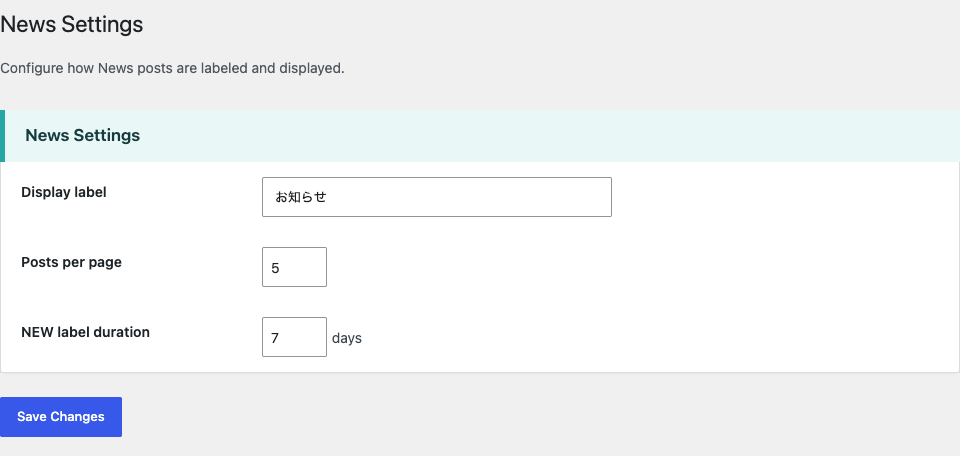
Display Label and Post Type
In IM Base > News Settings, the Display label field controls the News labels shown in the WordPress administration, including the menu name and labels such as Add New, Edit, View, and Search. The theme default is News; if an empty label is submitted, the default is used. The value is sanitized as text when saved.
Changing the display label does not change the public post type or its rewrite slug. The post type remains news, and its rewrite slug remains news.
News List Defaults
On the News Settings screen, Posts per page defaults to 5 and sets the number of News posts retrieved by the reusable News list. The value is sanitized as an absolute integer and cannot be less than 1.
NEW label duration defaults to 7 days and is sanitized as an absolute integer. A value of 0 disables the NEW label; otherwise, it applies to posts published within the specified number of days. These values are defaults for the reusable News list and do not control the main News archive query.
List Links and the NEW Badge
The News list is ordered by post date, with the newest posts first. The configured Posts per page value determines how many items the reusable News list displays.
When an external URL is entered for a News post, the list links to that URL and opens it in a new browser tab with noopener and noreferrer attributes. If no external URL is entered but the post has content, the item links to its standard News detail page. If neither is available, the item is displayed without a link.
The NEW badge is shown when the configured period is greater than zero and the post’s time is within that many days of the current time. The boundary is inclusive: a post exactly at the configured duration is still marked NEW.
Using the News List Shortcode
Use to display a list of News posts. The posts_per_page attribute sets the number of posts displayed, new_days sets the period during which the NEW badge is shown, and class sets the CSS class applied to the list. If class is omitted, the default is imb-news-list.
When posts_per_page or new_days is omitted, the shortcode uses the corresponding values saved in News Settings. Attributes supplied to a shortcode instance override those saved defaults for that instance only.
Archive and Single Views
The public News archive is enabled for the News post type, which uses the rewrite slug news. It is rendered by the generic archive.php template, which includes the breadcrumb template and displays the current WordPress query through the shared post-list component. The archive heading and description are generated for the current archive context, and pagination is displayed when posts are available.
Individual News detail pages use the generic single.php template. The page displays the title, publication date, optional featured image, and post content. Its breadcrumb includes Home, the News post type label, and the current post title. The Posts per page value in News Settings does not control the main News archive query; it is a default for the reusable News list instead.