
Social Media Settings
Configure social profile URLs and sharing services for an IM Base site.
Overview
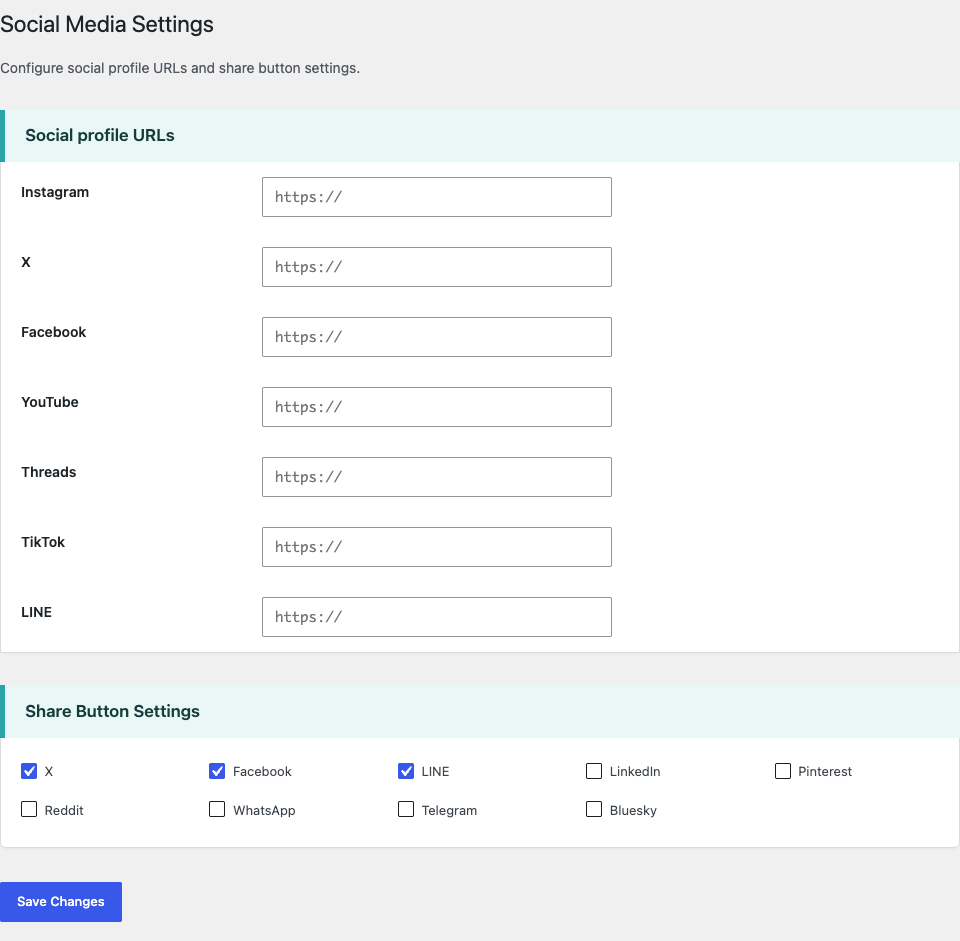
Social Media Settings controls the social profile URLs and share button settings used by IM Base. Open the IM Base settings menu and select Social Media Settings.
Social profile URLs identify the site’s accounts and are used for profile links. Share Button Settings controls which sharing services are enabled for share buttons. These are separate settings: entering a profile URL does not enable its share button, and enabling a share button does not add a profile link.
Social Profile URLs
Social Profile URLs supports Instagram, X, Facebook, YouTube, Threads, TikTok, and LINE. Enter the full URL of the corresponding social profile in its field, including the https:// prefix.
When the settings are saved, each value is sanitized with WordPress’s esc_url_raw function and stored as a profile URL. An empty field is saved as an empty value, so that service is not displayed among the site’s social profile links.
Displaying Social Profile Links
The

Each profile is rendered as a link with the saved URL, a service-specific CSS class, and the corresponding social icon. Links open in a new browser tab and include rel=”noopener noreferrer”; their accessible label is generated from the service name.
Share Button Settings
Share Button Settings provides checkboxes for X, Facebook, LINE, LinkedIn, Pinterest, Reddit, WhatsApp, Telegram, and Bluesky. X, Facebook, and LINE are enabled by default; all other services are disabled by default.
Each service is saved in the share settings as a boolean value. A checked box is stored as true, while a cleared box is stored as false, so disabled services remain represented in the saved settings with a false value.
Displaying Share Buttons
The







For the current page, IM Base URL-encodes the permalink and title, then uses them to build each service’s sharing link. The generated links are provided for X, Facebook, LINE, LinkedIn, Pinterest, Reddit, WhatsApp, Telegram, and Bluesky when those services are enabled. Each link opens in a new browser tab.
Structured Data
When IM Base theme SEO output is enabled, saved social profile URLs are added as sameAs values to Organization structured data when an organization name is configured. They are also added to LocalBusiness structured data when a local business name is configured. Empty or unconfigured profile URL fields are excluded.